Why give an AI agent its own computer?
An AI agent with its own computer works apart from your devices, keeps going when you close your laptop, keeps its files and sign-ins between tasks, and can be rolled back when it makes a mistake.
Three places an agent can work
| Your own computer | A browser session | A computer of its own | |
|---|---|---|---|
| Setup | Install an app | None | None, or self-host |
| Can reach your files | Yes | No | Only what you share |
| Works while you're away | Only if your machine stays on | For a short session | Yes |
| Keeps files and sign-ins | Yes | Usually not | Yes |
| If it makes a mistake | It happened on your machine | Limited to the session | Limited to its machine; restore a checkpoint |
| Can run code and install tools | Yes | No | Yes |
What an own computer makes possible
- Long work. A task that takes an hour doesn't need your laptop open for an hour.
- Real tools. A full machine has a shell, a file system and a browser, so the agent can download a file, convert it, run a script on it and upload the result.
- A working state. The half-finished spreadsheet, the cloned repository and the signed-in session are still there next time.
- Containment. The agent can't read your documents or your saved passwords, because they aren't on its machine.
- Undo. A snapshot before a risky command lets you put everything back.
- Watching. You can open the computer's screen, see what the agent is doing, and take over.
The costs
- Money. A computer that runs costs something per hour. Good systems put it to sleep when idle and wake it with everything intact.
- Sign-ins. The agent's computer isn't signed in to your accounts. You connect apps, or hand it logins through a password manager, ideally in a way the AI model never sees.
- Bot checks. Some websites challenge cloud browsers. Being able to take over for a moment helps.
One computer for all agents, or one each?
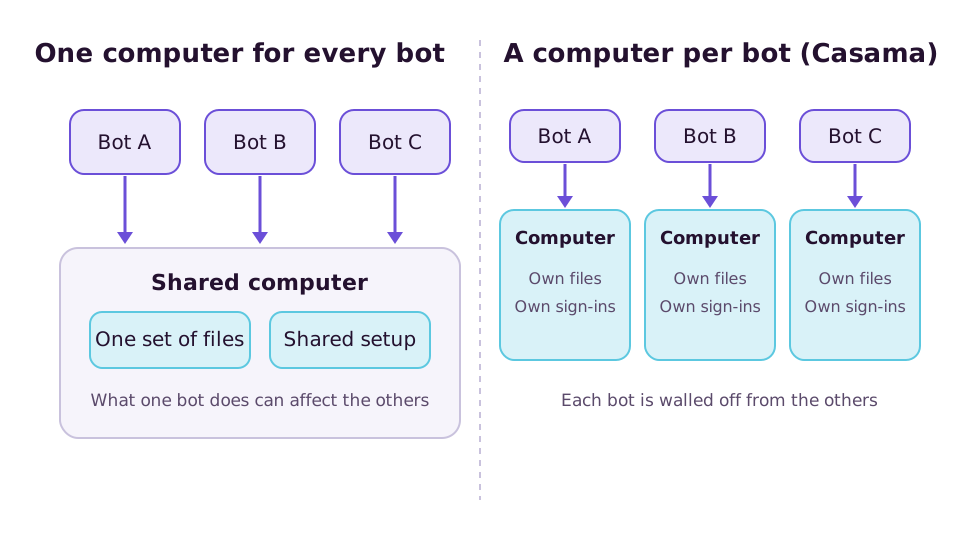
Some products give every agent its own machine. Others run all of a person's agents on one shared machine. One each means a research agent that installs odd software can't break the assistant that handles your mail, and each can be limited to the sites it needs.
How Casama does it
Every Casama bot works on its own isolated Linux machine with a shell, files and a browser, and optionally a full desktop. Computers sleep when idle and wake with everything intact. You can watch one live, take control, and restore a checkpoint taken before a destructive command. Logins from 1Password or Bitwarden are filled in on the way out and never shown to the model. If you'd rather a bot used your own machine for a task, you can lend it through the desktop app, where high-risk actions always ask.