Which AI agents ask before they act?
Most AI agents ask before some actions. What differs is which actions, whether you can set the rules yourself, whether payments always ask, and whether a mistake can be undone. Here is how to tell a real approval system from a single on-off switch.
What "asks before acting" should mean
An approval is only useful if it stops the right things and nothing else. An agent that asks about everything gets ignored, and one that asks about nothing gets switched off after its first mistake.
A good system has five parts:
- Risk per action. Reading a page is not sending an email. Each kind of action should have its own level.
- Your rules. You should be able to say "always allow this", "always ask about that", per agent and per app.
- Hard stops. Some actions, such as paying, should ask whatever you set.
- A clear request. The approval should show exactly what will happen: the recipient, the amount, the file.
- A way back. A snapshot before destructive steps, so "approve" isn't the last line of defence.
Questions to ask of any agent
| Question | Why |
|---|---|
| Can I choose what needs approval, or is it one switch? | One switch means all or nothing |
| Do payments always ask? | A setting you forgot shouldn't spend money |
| Where do approvals reach me? | If only in a browser tab, work stalls when you're away |
| Does a waiting task cost money? | Some bill for idle time |
| What happens after it reads a suspicious page? | It should get more careful, not carry on |
| Can I undo an approved step? | Checkpoints matter most when you approved by mistake |
| Is the rule set written down? | Published rules can be checked. "We're careful" can't |
How to compare products
Vendors describe approvals in very different words, and the details change often. Rather than trust a summary, look for each product's own page on permissions or safety, and check it against the table above. Our comparison pages record what each product says publicly, with the source and the date we read it.
How approvals work in Casama
Every tool has a risk level, and each bot has one of three settings:
| Setting | The bot asks before |
|---|---|
| Ask before acting | Every action that changes something |
| Ask for risky actions (the default) | Sending email or chat messages, calling people, making a page public, deleting outside its workspace, paid data lookups, and tools you marked "always asks" |
| Act on its own | Nothing, except high-risk actions on your own computer |
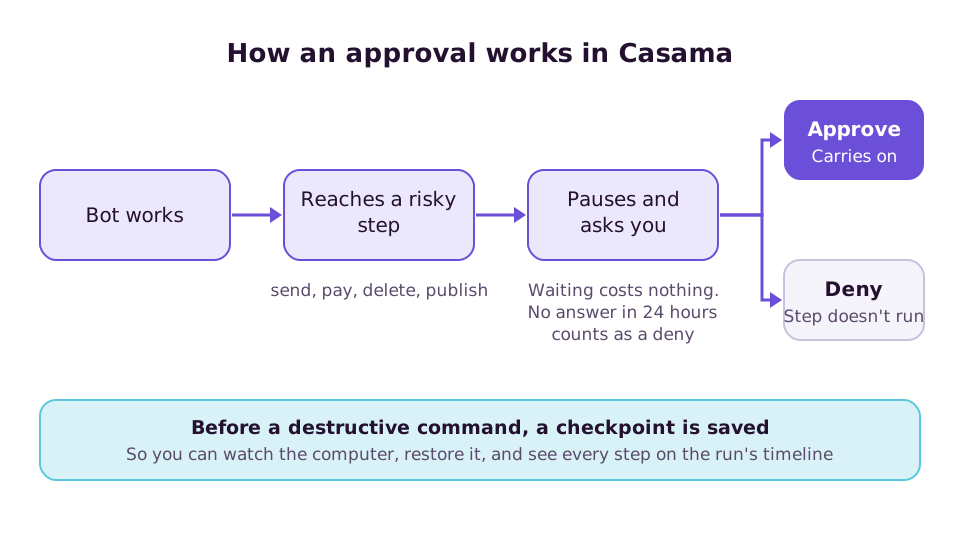
On top of that:
- Payments always ask, under every setting.
- Action rules let you allow, limit or always ask about a specific tool for a specific bot.
- Approvals reach you in the chat, in a "Needs you" list, by push notification, and in Slack as buttons.
- After reading untrusted content, actions that send data out ask first.
- A waiting run costs nothing and survives a server restart. A request with no answer after 24 hours counts as denied.
- Checkpoints are saved before destructive commands.
The full rules are in the autonomy guide.